2011년 3월 3일 목요일

Windows 2008 Server 인증 해제방법

윈도우 서버 2008은 SLLUA.exe, SLUI.exe, SLUINotift.dll 파일이 제어하는듯 합니다.
비스타 인증크랙을 사용하게 되면 서버 관리자 기능을 사용하지 못하는 단점이 있었습니다.
하지만 다음의 방법은 크랙이 아닌 윈도우에서 인증을 관리하는 파일을 제어하는 방법입니다.
1. 관리도구에서 서비스(Services) 선택


2. SL Notification서비스 항목 사용안함 (Disabled) (서비스중지)


3. 재부팅(Restart)

4. Windows/System32 디렉토리에 있는 SLLUA.exe파일의 등록정보를 누른다.


5. Security텝에서 Advanced(고급) 버튼을 클릭한다.


6. Owner텝에서 Edit버튼을 클릭한다.


7. ‘Other users or groups' 버튼을 클릭한다.


8. ‘Advanced’ 버튼을 클릭한다.


9. ‘Find Now’ 버튼을 클릭한다.


10. Administrator을 선택하고 OK버튼을 클릭한다.


11. OK버튼을 클릭한다.


12. 8번 항목의 창을 제외하고 이전에 열려있던 창에서도 Ok버튼을 클릭한다.


13. 8번 항목 창에서 Edit버튼을 클릭한다.


14. Administrator항목을 선택하고 ‘Full control’을 Allow로 체크한다.


15. 관리자 권한에 대해서 보안 메세지가 뜬다, Yes를 선택한다.


16. 8번창을 OK버튼을 클릭후 닫는다.


17. SLLUA.exe파일에서 마우스 오른쪽을 클릭하여 Delete(삭제)를 선택한다.


18. 삭제에 대해서 물어본다. Yes를 선택하여 삭제한다.


19. 인증과 관련된 파일은 SLUI.exe와 SLUINotift.dll도 동일한 인증구조를 지닌다. 이 2개의 파일에 대해서 8번 항목부터 18번 항목까지 동일한 방법을 통해 삭제하도록 한다.


20. 이제 테스트를 위해 2009년으로 날짜를 변경한다.


21. 날짜가 변경된것을 확인후 재부팅한다.


22. 1년을 앞으로 날짜를 변경후 패스워드 만료로 변경을 권하는 메세지가 뜬다. 이는 윈도우 서버의 라이센스 인증과는 무관한 계정의 패스워드이므로 무시하자.


23. 시스템의 등록정보를 확인해보자. 기간과 상관없이 인증기간에 대해 메세지가 없다.


24. 기존 비스타크랙을 사용할경우 서버 관리자가 동작하지 않는 문제가 발생하였다. 다음 관리자 화면을 통해 IIS를 설치하는 과정을 보게 되면 서버 운영과 관리에 문제가 없음을 확인할수 있다.


  • 정식으로 구매한 라이센스가 아닌경우 서버 운영상에 문제가 발생하여도 품질보증을 받을수 없습니다.
  • 해당 포스팅에서 설명하는 방법은 정상적인 라이센스 인증 방식이 아닙니다.
  • 포스팅된 방법으로 진행시 발생한 문제는 책임 지지 않으오니, 인증해제시 유의 하시기 바라며, 정품을 구입하여 사용할 수 있도록 하시기 바라며, 부득이 사용시에 이용하시기 바랍니다. 

[출처]http://www.greenpio.co.kr/427

JPEG Rotation and EXIF Orientation

JPEG Rotation and EXIF Orientation

Digital Cameras with orientation sensors allow auto-rotation of portrait images. Unfortunately, support for this feature is not widespread or consistently applied.

Digital Cameras with Orientation Sensors

Many newer digital cameras (both dSLR and Point & Shoot digicams) have a built-in orientation sensor. Virtually all Canon and Nikon digital cameras have an orientation sensor. The output of this sensor is used to set the EXIF orientation flag in the image file's metatdata to reflect the positioning of the camera with respect to the ground. Canon calls their sensor the "Intelligent Orientation" sensor. It is presumably a 2-axis tilt sensor, allowing 4 possible orientations to be detected (shown in the left side of the diagram below).
EXIF Orientation Flag Values

Note that one would only expect the four orientation settings shown on the left to be possible with a digital camera. The other four settings would imply that the resulting image was flipped horizontally before recording. Unless the camera were to encode the image right-to-left or know that you were taking a photo in a mirror, I don't see how these values will ever be used.
The values 1-8 represent the following descriptions (as shown by utilities that support EXIF field decode):
EXIF Orientation ValueRow #0 is:Column #0 is:
1TopLeft side
2TopLeft side
3BottomRight side
4BottomRight side
5Left sideTop
6Right sideTop
7Right sideBottom
8Left sideBottom

Auto-rotation in Digital Cameras

While your digital camera may include an option to "auto-rotate images" due to the camera's orientation, this is almost always just a "virtual rotation". A flag is set to indicate to the viewing software / LCD preview which way to rotate the image before display, rather than rotating the image content itself.
As lossless image rotation is a fairly compute-intensive operation, digital cameras are not likely to include true lossless rotation after capturing the photo. The CCD/CMOS sensor hardware is designed to stream raw data in a particular direction (e.g. rows then columns), and so it may be hard to incorporate true auto-rotation in-camera without a performance impact to continuous shooting (frames per second).

Software Support for Orientation

While there are countless software programs available today that display JPEG images, only a subset of them actually interpret the EXIF Orientation flag. Just like color management, many programs simply display the JPEG image as it is stored, and completely ignore any extra details stored in the file's metadata. The most important of these additional details is the Orientation flag, stored in the JPEG APP1 marker under EXIF IFD0.
ApplicationOrientation Supported?
Windows Picture and Fax ViewerNo
IrfanViewYes (need to enable)
Photoshop Yes

IrfanView Auto-rotation

In IrfanView, auto-rotation is not enabled by default. To ensure that images are auto-rotated, you will find the option located under Options->Properties in the JPG/PCD/GIF tab.

Windows Picture and Fax Viewer

Surprisingly, the Windows Picture and Fax Viewer (built into Windows XP) does not support the EXIF orientation flag. This is surprising, as the makers have obviously thought enough to support lossless rotation functions. So, what you will see shown by the viewer is the real image data (assuming landscape orientation), without respecting any indication from the camera as to the real orientation of the image.

Do not Rotate Photos in Windows Picture and Fax Viewer!

Another surprising detail is that if you decide to perform lossless image rotation (by using the Rotate Clockwise or Rotate CounterClockwise buttons), the EXIF Orientation flag is removed! As the flag is removed, if you do a double-rotation on a portrait photo (rotate, then rotate in the opposite direction), the resulting orientation observed by other viewers such as Photoshop will be wrong!
In fact, when you use the rotate functions of this utility, most of the image metadata (camera information, shot details, makernotes, etc.) are deleted. Therefore, I strongly recommend against using this program to rotate any of your digital photos.
I have also noticed that some images which were rotated that don't conform to 16x16 pixel multiples, the quantization tables don't appear to be rotated properly.
Because many new digital photographers may not be aware of this, Nikon even went so far as to issue a press release to warn of the potential dangers.
  • NOTE: The damage is done as soon as you press one of the rotate buttons . The disk icon is just for copying the file and should not be thought of as a Save button!
The following table details some of the metadata corrupted / modified by Windows Picture and Fax Viewer:
RemovedAddedModified
IFD0-OrientationIFD0-x1001
IFD0-x1002
IFD0-xA401
IFD0-xA402
IFD0-xA403
 
SubIFD-ExifInteroperabilityOffset
SubIFD-CustomRendered
SubIFD-ExposureMode
SubIFD-WhiteBalance
SubIFD-SceneCaptureType
 SubIFD-MakerNote
SubIFD-UserComment
MakerNotes: Nearly all fields zeroed
out except: SerialNumber, ImageNumber


Auto-Rotation Utilities

There are several tools that allow the image content to be rotated losslessly in software, based on the information stored in the EXIF orientation flag. By far the best time to perform this is during image import (e.g. from memory card). Most import applications (such as DownloaderPro) can do this during the copy operation (from memory card to hard drive). Doing so ensure that all programs can see the image properly rotated, without having to rely on the EXIF Orientation flag. This means that even programs such as Microsoft's Windows Picture and Fax Viewer will also show correct orientation for portrait / vertical images.
Most programs will rotate the image content and then update the Orientation flag to reflect the new orientation (usually a value of 1), while still leaving other metadata intact.

[출처]http://blog.naver.com/chunter99

Exif란?

1. EXIFExif(Exchangeable Imge File Format)은 일본¹ 카메라 회사들이 현 일본전자정보기술산업협회를 통해 만든 표준입니다. 1995년 11월 최초 제정되었으며, 2003년 09월 2.21 개정안이 현재(2006년 02월) 최신입니다. '일반 사용자들이 쉽게 사용할 수 있는 디지털 정지영상 카메라용 정보 교환 체제 구축'을 목표로 제정되었으며, 협회 표준으로서 법률적인 구속력을 가지고 있지는 않지만, 일본에 있는 거의 모든 디지털 카메라 업체가 참가해 제정한 표준이고 매우 간단한 기술이므로 현재 판매되고 있는 카메라는 거의 모두 EXIF를 탑재하고 있습니다.

2. EXIF 에 담겨진 내용


Exif²에서 기록하는 정보는 다음과 같습니다.

- 카메라 제조사
- 카메라 모델
- 카메라 펌웨어 버전

- 촬영 시각 (셔터 누른 순간)
- 저장 시각
- 촬영 장소의 위도 및 경도 (GPS 부착된 카메라의 경우)
- 촬영자 (시그니쳐 설정되는 카메라의 경우)

- 셔터 속도
- 렌즈초점거리
- 조리개 값
- 노출 보정치
- 촬영 프로그램
- 측광 모드
- 화이트 밸런스 설정
- B/W 기준점

- 픽셀 컴프레션/샘플링/포지셔닝 (Y:Cb:Cr)
- 컴포넌트 설정 및 압축률 (Y to C)
- 컬러 스페이스
- x 해상도
- y 해상도
- x 사이즈
- y 사이즈
- 단위
- 오리엔테이션

- 파일 압축 방식
- 이미지 이름
- 저작권자
- 스트립 카운트 (JPEG은 해당 없음)

- 그 외 (이 리스트는 Exif의 메타 전체를 기술하고 있지 않음)

3. 사용 방법
Exif는 촬영하는 시점에 카메라에 의해서 영상파일(JPEG)에 자동으로 기록됩니다. 2000년 이후 제작된 이미지 처리용 프로그램에서는 대부분 Exif를 읽을 수 있으며, 일부 프로그램에서는 저작권자 및 촬영자 정보를 기입할 수 있습니다. 저작권자 및 촬영자 정보 외의 수정은 순결성 및 정직성을 중요시하는 표준특성에 따라 판매용 프로그램에서는 일반적으로 지원하지 않습니다.

4. EXIF 정보 수정 & 삭제
대부분의 그래픽 뷰어가 지원을 해줍니다. AcdSee, 알씨 등은 파일 선택후, 마우스 오르쪽 버튼을 누르면 속성(Property)을 누르면 수정할수 있습니다. 포토샵의 경우, 메뉴 file -> file info를 이용하시면 됩니다.

삭제는 위의 그래픽뷰어등을 이용해 리싸이즈든지..기타 작업을 한후, 다른 이름으로 저장하면 exif정보가 지워집니다. exif를 남기려면, 저장할때 메타데이터도 꼭 같이 저장하도록 하여야 합니다.

5. 웹의 사진에 EXIF 정보를 보고 싶은데..
검색결과로 보니.. Opanda라는 프로그램을 많이들 이용하시는거 같습니다.
PowerExif 는 exif정보를 저장하는 기능까지 있고,
IExif 는 exif 정보를 보는 기능만 있습니다. 설치후, 웹사진에 마우스 오른쪽 버튼 누르면
exif info라는 메뉴가 뜹니다..(단..해당 사진에 exif 정보가 있어야갰지요)

6. 예제
exif 정보
카메라제조사[CameraMake] | OLYMPUS IMAGING CORP. 
카메라모델[CameraModel] | FE300,X830            
방향측정[Orientation] | top left
가로해상도[XResolution] | 72
세로해상도[YResolution] | 72
해상도단위[ResolutionUnit] | inches
소프트웨어[SoftwareUsed] | Version 1.0                   
날짜시간[DateTime] | 2010:04:16 13:16:53
YCbrCr위치[YCbCrPositioning] | co-sited
이미지설명[ImageDescription] | 0
노출시간[ExposureTime] | 1/200
조리개F값[F-Number] | F2.8
노출프로그램[ExposureProgram] | Creative program
감도[ISO] | ISO 50
날짜/시간 원본[Date/Time Original] | 2010:04:16 13:16:53
날짜/시간 기록[Date/Time Digitized] | 2010:04:16 13:16:53
압축비트수[CompBPP] | 4
노출보정[ExposureBias] | 0.00 eV
최대조리개[MaxAperture] | F2.8
측광방식[MeteringMode] | Pattern
광원[LightSource] | unknown
플래쉬[Flash] | Flash did not fire, compulsory flash mode
촛점거리[FocalLength] | 7.4 mm
색공간[ColorSpace] | sRGB
가로픽셀[PixXDim] | 4000 px
세로픽셀[PixYDim] | 3000 px
장면유형[SceneType] | A directly photographed image
노출방식[ExposureMode] | Auto exposure
화이트밸런스[WhiteBalance] | Auto white balance
디지털줌비율[DigitalZoomRatio] | 1
장면저장방식[SceneCaptureType] | Standard
대비[Contrast] | Normal
채도[Saturation] | Normal
압축[Compression] | JPEG compression
선명도[Sharpness] | Normal
EXIF 버전 | 0221
FlashPix 버전 | 0100
GainControl | None

2011년 3월 2일 수요일

JOIN 문

TIP JOIN 문
 
JOIN문이란..?
 - 테이블과 테이블을 연결하기 위한 방법
 - 10개든 20개든 갯수에 상관없이 연결이 가능
 - Outer Join과 Self Join도 있다.
 - Inner Join

 -- 형식 ----------
 SELECT 컬럼명.. FROM 테이블1, 테이블2 WHERE 테이블1.컬럼 = 테이블2.컬럼;
 또는..
 SELECT 컬럼명.. FROM 테이블1 INNER JOIN 테이블2 ON 테이블1.컬럼 = 테이블2.컬럼;

예) select a, b, c, d from MAX, BLOG where MAX.b = BLOG.b
      또는...
      SELECT a,b,c,d FROM MAX INNER JOIN BLOG ON MAX.b = BLOG.b;
 - MAX테이블의 b컬럼과 BLOG테이블의 b컬럼중 같은 것만 select(선택) 보여준다.

-- 다중 join ----------
 SELECT 컬럼명.. FROM 테이블1, 테이블2, 테이블3..
     WHERE 테이블1.컬럼 = 테이블2.컬럼 AND 테이블1.컬... ;

 예) select a,b,c,d from MAX,BLOG,NATE..
       where MAX.c = BLOG.c AND MAX.c = NATE.c .... ;
 - MAX.c컬럼과 BLOG.c컬럼이 같고 MAX.c컬럼과 NATE.c컬럼이 같고... 만 선택 보여준다.

-- 종합 예제 -----------
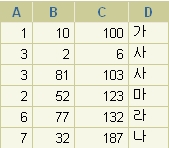
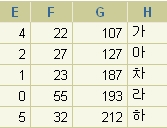
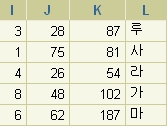
       MAX 테이블                                BLOG 테이블                           NATE테이블
     a    b    c    d                              e    f    g    h                         i     j     k     l
------------------                        ------------------                -----------------
     1   10   100  가                             4    22  107  가                        3   28   87    루
     3   81   103  사                             2    27  127  아                        1   75   81    사
     2   52   123  마                             1    23  187  차                        4   26   54    라
     6   77   132  라                             0    55  193  라                        8   48   102   가
     7   32   187  나                             5    32  212  하                        6   62   187   마

   
             MAX 테이블                               BLOG 테이블                           NATE 테이블
위와 같이 테이블이 구성 되어 있다.
예) 1번
select a,d,e,h from MAX, BLOG where MAX.b = BLOG.f;
또는..
select a,d,e,h from MAX INNER JOIN BLOG ON MAX.b = BLOG.f;

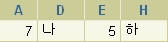
 - 결과 값은?   MAX의 b컬럼과 BLOG의 b컬럼이 같은것을 찾는 것인데... 보면.. 32라는 값이 있다.

    a    d    e   h       이렇게 나올거다..    
--------------------       
    7    나   5   하       

 역시 잘 맞아 떨어지는구만 -ㅅ-


이번에는.. 
예) 2번
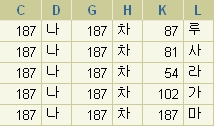
select c, d, g, h, k, l from MAX, BLOG, NATE where MAX.c = BLOG.g ;
또는...
select c, d, g, h, k, l from MAX inner join BLOG on MAX.c = BLOG.g ;

하면.. 


이렇게 NATE 테이블에 관한 조건을 주지 않으니
모두 해당되는 것으로 나온다.


조건을 줘 보자.


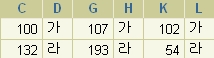
예)3번
select c, d, g, h, k, l from MAX, BLOG, NATE where 
      MAX.c = BLOG.g and BLOG.g = NATE.k;   

하나만 나온다.


마지막으로..
예)4번
select c, d, g, h, k, l from MAX, BLOG, NATE where 
      MAX.d= BLOG.h and BLOG.h = NATE.l;   

위와 같은 거당~ 그냥 한번 더 해보는 -ㅅ-;;


 * 단점 ----------
  기본적으로 양쪽 테이블의 컬럼 내용이 있을 경우만 만족한다.
  한쪽이라도 값이 없다면 Join문은 성립되지 않게 된다..
  해서 나온것이 OuterJoin 문이다.

OUTER JOIN ☞  Outer JOIN 이동  고고!!
 

Select - Join문 Oracle

 Table이 여러개가 있을때, 내가 원하는 정보가 단지 하나의 Table을 조회하면 만족하는 경우도  있겠지만, 여러 개의 Table의 정보를 함께 확인해야 내가 원하는 정보를 검색할 수 있을 때도 있을
 것이다. 예를 들어 사원의 정보를 확인하는 과정에서 그 사원이 근무하는 부서를 사원 Table에서
 제공하는 데이터인 부서 번호가 아닌 부서 Table에서 제공하는 해당 부서명으로 표시를 하고자
 한다. 이럴경우 내가 원하는 데이터가 사원 Table이 아닌 부서 Table에도 있기 때문에 참조하여야
 하는 Table이 하나가 아닌 두개의 Table이 된다. 이러한 형태의 정보를 제공하기 위해서 Join문이
 필요하다.


  ▷ Cartesian Product
       Cartesian Product은 From절에 Join을 수행할 경우 복수 개의 Table을 명시하고 Where절을
     생략한다든지 Where에 잘못된 Join조건을 수행할 시에 나타난다.
     Cartesian Product에 의한 행의 결과는 항상 두개 Table의 행의 수를 곱한 값이다.


1. Join문

  ▷ 형식
      Select ....
               From 테이블1, 테이블 2, [............... ]
               Where 테이블1.컬럼 = 테이블2.컬럼2[AND ....]
 
      SQL> select per.empno,
        2               per.emp_name,
        3               dept.dept_name,
        4               jikgb.jikgb_name
        5      from personnel per,
        6             code_dept dept,
        7             code_jikgb jikgb
        8      where per.empno between '98001' and '98020'
        9                   and per.dept_code = dept.dept_code
       10                  and per.jikgb_code = jikgb.jikgb_code
       11     order by per.dept_code, per.jikgb_code


       테이블이 두개 이상일 경우는 반드시 Where절에 테이블의 관게에 대한 정의가 있어야
       한다. 이대 꼭 한개의 컬럼만 관계가 있는 경우도 있지만, 여러 개의 컬럼이 관계있는
       경우도 흔하기 때문에 테이블 관계에 대한 주의가 요구된다.
      

2. Outer Join
    기본적으로 Join은 양쪽 테이블의 컬럼내용이 있을 경우만 만족한다. 이러한 단점을 극복
   하는 Join이 OuterJoin이다. OuterJoin은 Join이 수행되는 두 컬럼에 대해 한쪽 Table의
   Null값에 대해서도 Join을 수행하는 Join형태 이다.

   ▷ 형식
      SELECT ...............
      FROM 테이블1, 테이블2[,....]
      WHERE 테이블1.컬럼1[(+)] = 테이블2.컬럼2[(+)] [AND .....]
       
      SQL>select s.name Emp_Name,
        2              s.salary, s.title,
        3              d.name Department_Name
        4     from staff s, department d
        5     where s.deptid = d.id(+);

       EMP_NAME     SALARY   TITLE       DEPARTMENT_NAME
      ------------    --------    --------  -----------------------
       .............         .........      .........      .........................

     (+)의 위치는 기준이 되는 하나의 테이블의 반대편에 존재해야 한다.


3. Self Join
    Join은 항상 서로 다른 Table끼리 Join을 수행하는 것은 아니다. 경우에 따라서는 하나의
  Table을 가지고도 Join을 수행해야 되는 경우가 있다.

DELETE Join 문

-- 테스트 테이블 생성
CREATE TABLE dbo.TEST1 (
    DT  NVARCHAR(50),
    TP  NVARCHAR(50),
    AM  NVARCHAR(50),
    GT  NVARCHAR(50),
    WT  NVARCHAR(50)
) ON [PRIMARY]
CREATE TABLE dbo.TEST2 (
    DT  NVARCHAR(50),
    TP  NVARCHAR(50),
    AM  NVARCHAR(50)
) ON [PRIMARY]

-- 테스트 데이터 생성
INSERT INTO TEST1(DT,TP,AM,GT,WT) VALUES('A1','B1','C1','D1','E1');
INSERT INTO TEST1(DT,TP,AM,GT,WT) VALUES('A2','B2','C2','D2','E2');
INSERT INTO TEST1(DT,TP,AM,GT,WT) VALUES('A3','B3','C3','D3','E3');

INSERT INTO TEST1(DT,TP,AM,GT,WT) VALUES('A4','B4','C4','D4','E4');
INSERT INTO TEST1(DT,TP,AM,GT,WT) VALUES('A5','B5','C5','D5','E5');
INSERT INTO TEST1(DT,TP,AM,GT,WT) VALUES('A6','B6','C6','D6','E6');
INSERT INTO TEST1(DT,TP,AM,GT,WT) VALUES('A7','B7','C7','D7','E7');

INSERT INTO TEST2(DT,TP,AM) VALUES('A1','B1','C1');
INSERT INTO TEST2(DT,TP,AM) VALUES('A2','B2','C2');
INSERT INTO TEST2(DT,TP,AM) VALUES('A3','B3','C3');

INSERT INTO TEST2(DT,TP,AM) VALUES('A8','B8','C8');
INSERT INTO TEST2(DT,TP,AM) VALUES('A9','B9','C9');
INSERT INTO TEST2(DT,TP,AM) VALUES('A0','B0','C0');

  --> 중복 데이터는 노랑색밑줄 데이터

-- 중복 데이터 확인
 SELECT  B.DT, B.TP, B.AM
FROM TEST1 A , TEST2 B
WHERE A.DT = B.DT
AND A.TP = B.TP
AND A.AM = B.AM

-- 중복 데이터 삭제
DELETE TEST2
FROM TEST2 INNER JOIN TEST1
ON TEST2.DT = TEST1.DT
 AND TEST2.TP = TEST1.TP
 AND TEST2.AM = TEST1.AM

[QRcode] 온라인생성 데모(Perl CGI & PHP Script)

[QRcode] 온라인생성 데모(Perl CGI & PHP Script)

QRcode Perl CGI & PHP scripts ver. 0.50

see README-e.txt
(Thank for proofreading of Mr.Keith Twombley.)

demo

Important notice: ver.0.50f or lower have security problems.Please update to latest version.

QRcode Perl CGI & PHP scripts ver. 0.50i

qr_img0.50i.tar.gz (1007KB)
Changed "ereg" to "preg_match" for PHP 5.3.0 or later.

QRcode Perl CGI & PHP scripts ver. 0.50g (Old Version)